

A forex price feed can appear to freeze when the quoted bid and ask prices stop updating for a short period even though the market itself is still active. The screen may show the same price for several seconds, the countdown may continue, or a chart may appear stuck before suddenly updating with a new quote.
This does not automatically mean that the forex market has stopped. The foreign exchange market is decentralised, and the price displayed by a broker or trading platform depends on a chain of data sources, servers, network connections and liquidity providers. A temporary interruption anywhere in that chain can make the feed appear frozen.
What Does a Frozen Forex Price Feed Mean?
A frozen price feed means that the platform is temporarily receiving no new usable quotes, or that the platform is not displaying the latest quotes correctly.
There are two important possibilities:
- The market data has stopped reaching the platform.
- The data is arriving, but the platform is delayed in processing or displaying it.
These situations can look identical on a chart, but their causes can be very different.
1. Temporary Loss of Connection Between Your Platform and Broker
The simplest explanation is a connectivity problem. Your trading terminal continuously communicates with the broker’s infrastructure. If that connection becomes unstable, incoming quotes can stop temporarily.
This can happen because of:
- Weak or unstable internet
- Wi-Fi packet loss
- Mobile network interruptions
- VPN routing problems
- Temporary server congestion
- Network maintenance
If the connection is restored, the platform may suddenly receive several updated quotes and the chart can appear to jump forward.
2. Broker Server Problems
Your internet connection may be perfectly normal while the broker’s trading server experiences an issue.
Trading platforms depend on servers that handle market-data distribution, account information, order processing and other functions. A temporary server problem can therefore affect price updates even when other websites and applications continue working normally.
This is one reason it is useful to check whether other instruments on the same platform are also frozen.
3. Liquidity Provider or Price Aggregation Problems
Forex brokers commonly obtain pricing from one or more liquidity providers and may aggregate quotes before displaying them to clients.
If a liquidity source temporarily stops supplying usable prices, becomes disconnected or experiences a technical problem, the broker may have fewer fresh quotes available.
This is particularly relevant around unusual market conditions, rapid volatility and periods of reduced liquidity.
4. Extremely Low Liquidity
Forex trades continuously during the normal global trading week, but liquidity is not constant throughout the day.
During quiet periods, weekends, holidays and certain rollover periods, the number of active participants can fall sharply. With fewer competitive quotes available, price updates may become less frequent.
A slower stream of quotes is not necessarily the same as a technical freeze.
5. Market Rollover and Daily Trading Breaks
Some brokers have a short daily rollover period during which liquidity conditions and trading services can change. Depending on the instrument and broker, spreads may widen and quote frequency may temporarily behave differently.
Traders should know their broker’s specific rollover schedule rather than assuming that every unusual quote behaviour is a platform failure.
6. Major News Can Overload Market Infrastructure
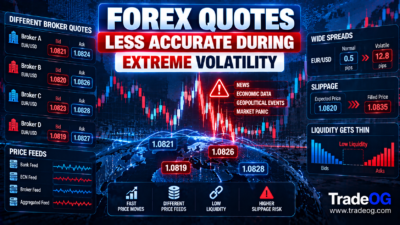
During major economic announcements, prices can change extremely quickly. Central-bank decisions, employment reports, inflation data and unexpected geopolitical developments can create a sudden surge in market activity.
When quote traffic increases dramatically, a platform may temporarily lag behind the underlying market. You may see a frozen-looking price followed by a rapid series of updates.
High volatility can also increase spreads and slippage. A delayed display should therefore not be interpreted as a guarantee that an order can be executed at the last visible price.
7. Platform Performance Problems
The problem may be inside the trading application rather than the broker’s market-data feed.
A platform running many charts, indicators, expert advisors or scripts can consume substantial CPU and memory resources. If the application becomes overloaded, charts may stop visually updating even though the underlying connection remains active.
Closing unnecessary charts and restarting the platform can help determine whether the problem is local to the application.
8. The Chart Is Frozen but the Trading Server Is Not
It is possible for a chart to appear frozen while other parts of the trading platform remain functional.
For example, the market-watch panel may update while one chart does not. This can indicate a chart rendering, symbol subscription or application issue rather than a complete loss of market data.
Always compare multiple symbols and the platform’s quote panel before assuming the entire feed has stopped.
9. Symbol-Specific Data Problems
Sometimes only one currency pair appears frozen. That can point toward a symbol-specific problem.
Possible explanations include:
- A temporary issue with the symbol’s data stream
- Insufficient liquidity for that particular instrument
- A broker-specific quote problem
- Incorrect symbol selection
- A temporary subscription or feed issue
If EUR/USD continues moving while one less-liquid pair remains unchanged, the problem may not be your entire platform.
10. Different Brokers Can Continue Quoting Different Prices
Forex is an over-the-counter market, so brokers do not all receive an identical price stream at precisely the same moment.
One broker may continue receiving quotes while another temporarily displays the last available price. This is also why two brokers can sometimes show different highs and lows for the same currency pair.
Read our guide on why two brokers can show different forex highs and lows for a deeper explanation of price-feed differences.
11. Why a Frozen Price Can Suddenly Jump
The most confusing situation is when a price appears unchanged for several seconds and then suddenly moves a large distance.
The market may not have moved by the entire displayed amount during that final update. Instead, your platform may have missed or delayed intermediate quotes.
For example, imagine a pair is displayed at 1.08500. The screen remains unchanged for several seconds. It then updates directly to 1.08545. That does not necessarily mean the market travelled smoothly from 1.08500 to 1.08545 at the exact moment of the update. Some intermediate prices may simply not have reached your screen.
12. A Frozen Feed Can Be Dangerous During an Open Trade
If you have an active position and the displayed price freezes, avoid assuming that your stop-loss or take-profit is also frozen.
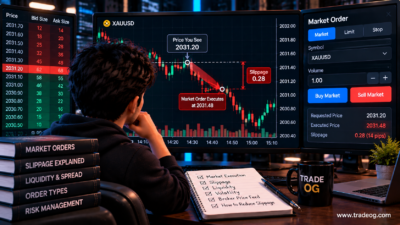
Execution takes place on the broker’s trading infrastructure, subject to its rules and available liquidity. The price visible on your screen may lag behind the price used for execution.
This becomes particularly important during fast markets, news releases and sudden liquidity changes.
How to Tell Whether the Problem Is Your Internet or the Broker
Use a simple diagnostic process instead of immediately placing another trade.
- Check whether your internet connection is stable.
- Look at multiple currency pairs.
- Check whether bid and ask prices are changing.
- Compare the broker’s quote panel with the chart.
- Check another device if available.
- Restart the trading platform.
- Check the broker’s service-status or maintenance information.
- Compare the same instrument with a separate reputable market-data source.
If only one chart is frozen, the problem may be local. If every symbol stops updating, investigate the connection or broker infrastructure.
Should You Trade When the Price Feed Is Frozen?
Generally, no. A frozen feed is a poor environment for discretionary trading because you do not have reliable confirmation of the current market price.
Opening a trade based on a stale quote can create several problems:
- Unexpected execution price
- Higher slippage
- Wider spreads
- Delayed stop-loss execution
- False breakout decisions
- Incorrect chart analysis
Waiting for a stable quote stream is usually more sensible than trying to guess what happened during the missing interval.
What Happens to Stop-Loss Orders During a Feed Freeze?
A displayed freeze does not automatically mean that the broker’s execution system has stopped.
Depending on the broker and order type, protective orders may continue to be processed when the relevant market price reaches the broker’s execution conditions. However, during volatile conditions the actual fill can differ from the expected stop price because of gaps, slippage and liquidity.
Traders should therefore understand the broker’s execution and stop-order policy rather than relying only on what appears on the chart.
Forex Price Feed Freeze vs Genuine Market Consolidation
Do not confuse a slow-moving market with a frozen feed.
| Situation | Typical behaviour | Likely explanation |
|---|---|---|
| Prices update slowly | Small changes continue appearing | Low activity or low volatility |
| One chart stops updating | Other symbols continue moving | Chart or symbol issue |
| All symbols stop | No fresh quotes across platform | Connection or server problem |
| Quotes freeze then jump | Large update after delay | Data interruption or latency |
| Spread becomes very wide | Bid and ask separate sharply | Reduced liquidity or volatility |
Why Scalpers Should Pay Special Attention
A temporary data delay can be much more significant for a scalper than for a swing trader.
If a strategy targets only a few pips, even a short delay can materially change the entry, stop distance and expected reward-to-risk ratio. The trader may believe a setup still exists when the live market has already moved.
Scalpers should therefore pay close attention to execution quality, broker infrastructure, spread behaviour and latency rather than evaluating a strategy solely from historical charts.
How Traders Can Reduce the Risk of a Frozen Feed
- Use a reliable internet connection.
- Keep the trading platform updated.
- Avoid unnecessary VPN routing when it increases latency.
- Monitor broker announcements and maintenance windows.
- Know the broker’s rollover schedule.
- Keep a backup internet connection for critical trading.
- Do not rely on a single chart as the only source of confirmation.
- Understand your broker’s execution and slippage policies.
Frequently Asked Questions
Can a forex price feed freeze even when the market is open?
Yes. The global forex market can remain open while a broker, liquidity provider, network connection or trading platform temporarily fails to deliver fresh quotes.
Does a frozen forex chart mean trading has stopped?
Not necessarily. A frozen chart can result from a local application problem, network interruption or delayed data. The underlying market may continue moving.
Why does the price jump after being frozen?
The platform may have missed or delayed intermediate quotes and then displayed the latest available price. The visible jump therefore does not always represent one instantaneous market move.
Can a frozen feed cause slippage?
Yes. If the displayed price is stale while the live market continues moving, an order may be executed at a different price. Fast markets can increase this difference.
Should I close my trade if my price feed freezes?
Do not make a rushed decision based only on a frozen chart. First determine whether the issue is local, broker-wide or temporary, and understand how your broker handles execution and protective orders.
Final Takeaway
A temporary forex price-feed freeze can be caused by connectivity problems, broker-server issues, liquidity-provider interruptions, low liquidity, rollover conditions, extreme news-driven traffic, platform performance or symbol-specific data problems.
The key point is that a frozen screen does not mean the underlying forex market has stopped. Your platform may simply be showing the last quote it successfully received.
When the feed behaves unusually, verify the problem before trading. Check multiple symbols, confirm connectivity, compare data sources and understand your broker’s execution conditions. This simple discipline can prevent a stale quote from becoming an avoidable trading loss.
TradeOG Disclaimer
This article is for educational and informational purposes only and does not constitute financial, investment or trading advice. Forex, CFDs, gold and other leveraged instruments involve substantial risk of loss. Market-data availability, spreads, execution and slippage can vary between brokers and market conditions. Always understand your broker’s terms and execution policies and trade according to your own risk tolerance.