
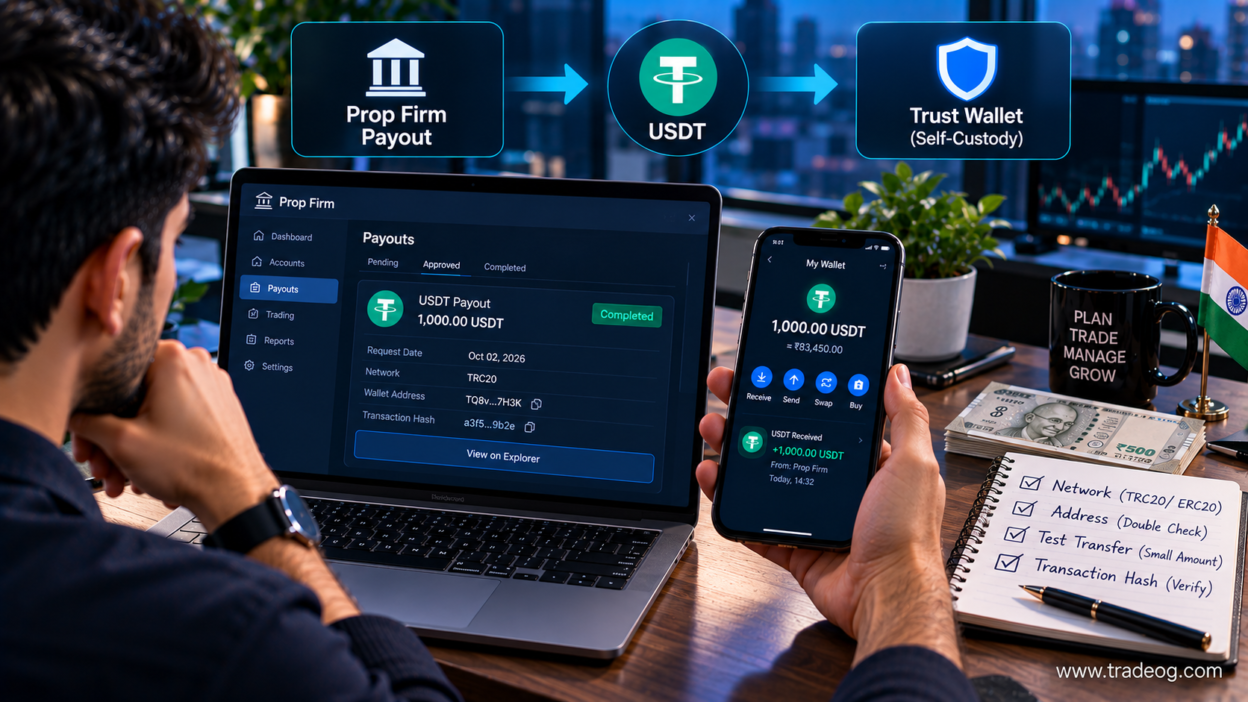
Moving a USDT payout from a prop firm to Trust Wallet is usually straightforward at the technical level, but the most important part is not clicking “Withdraw.” The critical steps are choosing the correct USDT network, copying the correct Trust Wallet receiving address, checking the prop firm’s withdrawal settings, and verifying the transaction after it is sent.
For Indian traders, there is another layer to consider: receiving USDT in a self-custody wallet does not by itself determine whether the underlying trading or prop-firm arrangement is permitted under Indian law or how the income should be taxed. This guide explains the practical wallet-transfer process while keeping those regulatory and record-keeping issues separate.
Can a Prop Firm Send USDT Directly to Trust Wallet?
Yes, if the prop firm or its payout provider supports USDT withdrawals to an external cryptocurrency wallet and supports a network compatible with your Trust Wallet address.
The basic flow is:
Prop firm payout approved → Select USDT → Select supported network → Enter Trust Wallet address → Confirm withdrawal → Blockchain confirmation → USDT appears in Trust Wallet
Trust Wallet is a self-custody wallet. Its official USDT information says users control their private keys, while its receiving guide explains that the recipient generates an address for the relevant asset and shares that address with the sender. Trust Wallet’s official USDT wallet guide and Trust Wallet’s receiving guide explain the process.
The prop firm, not Trust Wallet, actually sends the transaction. The blockchain processes the transfer.
Before You Start: Understand What You Are Actually Moving
A USDT payout is not the same thing as a bank transfer in USD.
USDT is a crypto asset designed to track the US dollar. It can exist on multiple blockchain networks. Your prop firm may therefore ask you to choose both:
- Asset: USDT
- Network: the specific blockchain used for that USDT transfer
Those two fields must match your receiving wallet setup.
For example, a payout page might offer USDT on a particular network. You must select the corresponding USDT asset/network in Trust Wallet and use the receiving address displayed for that network.
Do not choose a network based only on the fact that both screens say “USDT.”
Step 1: Check Whether Your Prop Firm Supports External USDT Withdrawals
Log in to your prop-firm dashboard and open the payout or withdrawal section.
Look for options such as:
- Crypto
- USDT
- Stablecoin
- External wallet
- Blockchain withdrawal
The exact menu will vary between firms and payout providers.
Before requesting the payout, check:
- minimum payout amount;
- maximum payout amount;
- supported USDT networks;
- withdrawal fee;
- processing time;
- whether the payout provider performs additional verification;
- whether external self-custody wallets are allowed;
- whether your country is eligible for the payout method.
If the firm only supports a particular payment provider or exchange, do not assume that you can enter a Trust Wallet address directly.
Step 2: Open Trust Wallet
Use the official Trust Wallet application or browser extension. Avoid downloading wallet software from links sent through Telegram, WhatsApp, Discord or unsolicited email.
Trust Wallet provides an official download page for its supported applications and browser extension. Use the official Trust Wallet download page rather than a third-party download link.
If you already have a wallet, unlock it normally. Never give your recovery phrase or private key to the prop firm, payout provider or anyone claiming to “verify” your wallet.
Step 3: Find USDT in Trust Wallet
From the Trust Wallet home screen, search for USDT.
This is where you need to slow down.
USDT may be displayed for different blockchain networks. Select the version that corresponds to the network your prop firm will use.
Do not assume that the first USDT result is automatically the correct one.
Trust Wallet’s current documentation emphasizes checking the asset and network before sending or receiving crypto. Its receiving instructions tell users to select the specific crypto, tap Receive, and copy the displayed address.
Step 4: Tap Receive and Copy Your USDT Address
Once you have selected the correct USDT asset and network:
- Open the USDT asset.
- Tap Receive.
- Review the network shown on the receiving screen.
- Copy the wallet address.
- If supported, you can also use the QR code.
Trust Wallet’s official receiving guide explains that the wallet displays the receiving address below the QR code and that the address can be copied and shared with the sender. See Trust Wallet’s official receiving instructions.
At this stage, you are not sending anything. You are simply providing the destination address to the payout sender.
Step 5: Match the Network Before You Paste the Address
This is the most important step in the entire process.
Suppose your prop firm gives you these choices:
| Option | What You Must Check |
|---|---|
| USDT on Network A | Trust Wallet must provide compatible USDT receiving support on Network A |
| USDT on Network B | Use the corresponding Network B USDT receiving address |
| USDT on Network C | Confirm Trust Wallet supports the exact asset/network combination |
The names above are intentionally generic because supported networks can change. Always use the network currently displayed by both the prop firm and Trust Wallet at the time of the withdrawal.
A blockchain transaction can be irreversible. Trust Wallet’s terms state that it cannot cancel or modify blockchain transactions and that transfers are processed on the applicable blockchain network rather than on a network operated by Trust Wallet. Trust Wallet’s Terms of Service explain these limitations.
Step 6: Enter the Trust Wallet Address in the Prop Firm Dashboard
Return to the prop firm’s payout page.
Select the crypto payout method and choose USDT.
Then select the exact network that you verified in Trust Wallet.
Paste the Trust Wallet address into the wallet-address field.
Do not type the address manually.
After pasting, compare:
- first several characters;
- last several characters;
- network name;
- asset name;
- any memo/tag requirement shown by the payer.
If the payout page displays a QR option, use the official wallet QR workflow when available.
Step 7: Check Whether a Memo or Tag Is Required
Some crypto transfers use an additional memo, tag or payment identifier.
A normal self-custody address may not require one, but you should follow the exact instructions displayed by the payout provider.
If the provider requires a memo/tag and you omit it, the transfer can become difficult to reconcile or recover.
Never invent a memo or tag. If the payout screen is unclear, stop and confirm with the provider through its authenticated support channel.
Step 8: Review the Prop Firm Withdrawal Fee
Your approved payout and the amount that reaches your wallet may not always be identical.
Possible deductions can include:
- prop-firm payout fees;
- payment-provider fees;
- crypto withdrawal fees;
- network-related charges;
- other provider-specific costs.
Read the final confirmation screen before submitting the withdrawal.
Do not calculate your expected Trust Wallet balance solely from the profit amount shown in the trading dashboard.
Step 9: Consider a Small Test Transfer
If the prop firm permits partial or test withdrawals, a small test transaction can reduce the risk of making a large transfer to an incorrectly configured address.
For example, instead of immediately moving the entire payout, a trader could first confirm that a small amount reaches the intended USDT wallet on the correct network.
This is not a guarantee against every problem, but it can confirm that the basic address-and-network setup is correct.
For large transfers, the additional confirmation can be worth the small test cost.
Step 10: Submit the USDT Withdrawal
After checking the asset, network, address, fee and payout amount, submit the withdrawal.
The prop firm may show a status such as:
- Requested
- Pending
- Under review
- Approved
- Processing
- Sent
- Completed
Do not assume that “approved” means the blockchain transaction has already been broadcast.
Likewise, “completed” can refer to the provider’s internal process rather than the final appearance of the USDT in your wallet.
Step 11: Get the Transaction Hash
Once the payout is broadcast to the blockchain, the provider may give you a transaction hash, also called a transaction ID or TxID.
This is one of the most useful pieces of evidence for troubleshooting.
Save:
- transaction hash;
- sending wallet address if shown;
- receiving Trust Wallet address;
- USDT amount;
- network;
- timestamp;
- prop-firm payout reference;
- payout statement.
You can use the appropriate blockchain explorer for the network to check whether the transaction has been confirmed.
Step 12: Check Trust Wallet After Blockchain Confirmation
After the transaction receives the necessary blockchain confirmation, open Trust Wallet and check the USDT balance.
If the balance does not appear immediately:
- confirm that the transaction hash is correct;
- confirm the transaction status on the relevant blockchain explorer;
- confirm that the receiving address matches your wallet;
- confirm that the asset and network are correct;
- make sure the correct USDT asset is enabled in Trust Wallet;
- allow for blockchain confirmation and wallet display delays.
Do not send another payout simply because the first transaction has not appeared immediately.
What If the Prop Firm Says “Sent” but Trust Wallet Shows Nothing?
Start with the transaction hash.
If you have a valid transaction hash, you can determine whether the transaction was actually broadcast and whether it has confirmed.
There are several possibilities:
- the provider has not broadcast the transaction yet;
- the transaction is still pending;
- the wallet address was entered incorrectly;
- the wrong network was selected;
- the USDT asset is not currently displayed in the wallet interface;
- the provider’s status changed before final blockchain settlement.
Trust Wallet’s terms specifically note that blockchain networks can delay or fail to complete transaction details and that Trust Wallet cannot cancel or modify submitted transactions.
Do not pay a stranger who claims they can “unlock” a pending transaction.
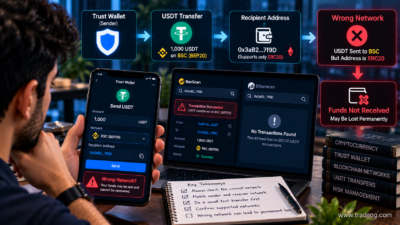
What Happens If You Choose the Wrong USDT Network?
This is the most serious technical mistake to avoid.
USDT can exist across multiple blockchains. A wallet address or asset configuration for one network should not automatically be treated as compatible with another.
If a payout is sent using a network that is not supported by the receiving setup, recovery may depend on the exact network, token contract, wallet capabilities and transaction details. In some situations recovery can be difficult or impossible.
Trust Wallet’s official guidance tells users to verify the address and transaction details because blockchain transactions can be irreversible. Trust Wallet’s sending and receiving guidance also recommends checking the coin type and network before a transaction.
What If the Wrong Wallet Address Was Used?
If you accidentally provide the wrong address and the prop firm has not sent the payout yet, contact the provider immediately and ask whether the withdrawal can be cancelled or the destination changed.
If the transaction has already been broadcast and confirmed, the situation is much more difficult.
Blockchain transfers generally cannot simply be reversed like a bank transfer.
Do not trust anyone who asks for your recovery phrase to recover the funds.
Never Give the Prop Firm Your Trust Wallet Recovery Phrase
A payout sender normally needs a receiving address. It does not need your Secret Recovery Phrase or private key.
Trust Wallet describes its USDT wallet as self-custody and states that the user controls the private keys. Its security guidance says users should never share private keys or their secret phrase. Trust Wallet’s official USDT security guidance reinforces this point.
Anyone asking for your recovery phrase to “verify,” “activate,” “unlock” or “receive” a payout should be treated as a scam risk.
How to Recognise a Fake Prop-Firm or Wallet Support Message
Be particularly careful with messages claiming:
- your payout is blocked until you pay a wallet activation fee;
- you must send USDT first to unlock your profit;
- Trust Wallet support needs your seed phrase;
- you need to connect your wallet through an unknown website;
- your payout will expire unless you transfer crypto immediately;
- you need to pay a “tax” in USDT to a personal wallet.
Verify any payout problem inside the official prop-firm dashboard and use the company’s authenticated support channel.
Do You Need USDT in Trust Wallet Before Receiving the Payout?
No. You normally need the appropriate receiving address, not an existing USDT balance.
The purpose of the receiving address is to tell the blockchain where the incoming USDT should be credited.
However, having USDT in the wallet is different from having the native asset required for certain network fees when you later move the USDT out. Network fee requirements depend on the blockchain and transaction.
Trust Wallet explains that network fees can still apply to crypto transactions and that the fee is determined by the relevant blockchain network.
Can You Move USDT From Trust Wallet to an Indian Bank Account?
Not directly as a normal bank transfer.
Trust Wallet is a self-custody crypto wallet, not an Indian bank account. If you want to convert USDT into INR, you generally need a supported conversion or exchange route that can sell or convert the asset and then provide a bank withdrawal where available.
The exact availability, KYC process, fees, limits and compliance requirements depend on the provider you use.
The conversion creates another important record in your transaction history.
For a larger payout, retain the:
- original prop-firm payout statement;
- USDT transaction hash;
- Trust Wallet receiving address;
- conversion/exchange statement;
- INR withdrawal record;
- bank statement showing the resulting credit.
For related information, see Can Indian Traders Receive Forex Profits in USDT Through Trust Wallet?.
Important: Receiving USDT Does Not Bypass Indian Forex Rules
The fact that a payout arrives as USDT does not automatically establish that the underlying forex activity is permitted for an Indian resident.
The Reserve Bank of India states that resident persons can undertake forex transactions only with authorised persons and for permitted purposes under FEMA, and that permitted electronic forex transactions should be undertaken on RBI-authorised electronic trading platforms or recognised stock exchanges under the applicable conditions. RBI’s guidance on unauthorised forex trading platforms explains this position.
Therefore, this article should not be interpreted as a method for bypassing RBI, FEMA, banking or tax requirements.
USDT Tax and Record-Keeping for Indian Traders
Crypto-related tax treatment in India depends on the nature of the transaction and the underlying income.
The Income Tax Department’s current materials continue to provide a special 30% rate for income from transfer of Virtual Digital Assets under Section 115BBH and require transaction-level VDA reporting in the relevant schedule. Current Income Tax Department VDA filing material shows the VDA schedule and 30% rate.
That does not mean that every prop-firm payout received in USDT should automatically be classified as a 30% VDA gain. The underlying payout and any later transfer of USDT can require separate analysis.
For significant or recurring payouts, maintain complete records and obtain advice from a qualified Indian tax professional who can examine the actual agreement and transaction flow.
Example: Moving a 1,000 USDT Prop-Firm Payout
Imagine a prop firm approves a payout of 1,000 USDT.
A sensible process would be:
- Confirm that the prop firm allows external USDT withdrawals.
- Check which USDT networks are currently supported.
- Open Trust Wallet.
- Select the matching USDT asset/network.
- Tap Receive.
- Copy the displayed wallet address.
- Paste it into the prop firm’s withdrawal page.
- Confirm the network and compare the address.
- Review the payout fee and net amount.
- Submit the withdrawal.
- Save the payout reference.
- Save the blockchain transaction hash once available.
- Verify the transaction on the relevant blockchain explorer.
- Confirm that the USDT appears in Trust Wallet.
The important point is that 1,000 USDT on the payout dashboard is not necessarily the same as 1,000 USDT appearing in your wallet if the provider deducts a withdrawal charge.
Trust Wallet USDT Transfer Checklist
| Check | What to Confirm |
|---|---|
| Prop firm | External crypto withdrawal is supported |
| Asset | USDT is selected |
| Network | Same network is supported on both sides |
| Address | Copied directly from Trust Wallet |
| Memo/tag | Follow the provider’s instructions if required |
| Fee | Review the final payout amount |
| Security | Never share recovery phrase/private key |
| Transaction hash | Save it after broadcast |
| Explorer | Verify confirmation on-chain |
| Records | Save payout, wallet and conversion evidence |
Frequently Asked Questions
Can I send a prop-firm USDT payout directly to Trust Wallet?
Yes, if the prop firm or its payout provider supports external USDT withdrawals on a network compatible with your Trust Wallet receiving address.
Which USDT network should I choose?
Choose the network supported by both the prop firm and your Trust Wallet USDT receiving setup. Do not select a network simply because it is cheaper or because the token is called USDT.
Do I need to deposit USDT into Trust Wallet first?
No. You normally only need the correct receiving address. However, moving the USDT later can require network fees.
How long does a USDT prop-firm withdrawal take?
There is no universal time. The prop firm’s internal processing, payout provider, blockchain network and confirmation requirements can all affect timing.
What should I do if the payout says completed but I have no USDT?
Request or locate the transaction hash and verify it on the relevant blockchain explorer. Also confirm the receiving address and network before contacting the provider.
Can a prop firm ask for my Trust Wallet seed phrase?
No. A normal crypto payout should require a receiving address, not your Secret Recovery Phrase or private key.
Can I convert the USDT to INR after receiving it?
Potentially, through a supported conversion provider or exchange. Availability, KYC, fees, limits and compliance requirements vary, so check the current provider terms.
Is receiving USDT proof that my forex trading is legal in India?
No. The payment method does not determine whether the underlying forex activity complies with Indian law. RBI/FEMA requirements must be considered separately.
Final Takeaway
Moving USDT from a prop firm to Trust Wallet is mainly a process of getting the right receiving address on the right blockchain network and then verifying the transaction after it is sent.
The safest workflow is:
Check the prop firm’s USDT support → identify the exact network → open the matching USDT asset in Trust Wallet → tap Receive → copy the address → paste and verify it in the payout dashboard → review fees → submit → save the transaction hash → verify on-chain → confirm the wallet balance.
For Indian traders, the technical transfer is only one part of the process. Keep the payout statement, blockchain transaction record and any later INR conversion evidence, and do not treat USDT as a way to bypass applicable forex, FEMA, tax or banking requirements.
Disclaimer: TradeOG provides educational and informational content only. Nothing in this article should be treated as financial, investment, legal, tax, banking, regulatory or professional advice. Trust Wallet, prop-firm payout methods, supported USDT networks, fees, blockchain conditions and Indian regulatory or tax requirements can change. Always verify the current provider terms, wallet network, RBI/FEMA requirements and applicable tax treatment before moving funds.
[…] For the previous step in this TradeOG series, see How to Move USDT From a Prop Firm to Trust Wallet. […]
[…] How to Move USDT From a Prop Firm to Trust Wallet […]